
AI meeting assistant for Microsoft Teams, Google Meet and Zoom
Other tools take notes. MeetSwift gets the work done.
MeetSwift joins your calls, writes the summary, and turns every action item into a task with an owner and a due date. Then it keeps track until the work is finished.
Free plan. No card needed.
How it works
- 1
MeetSwift joins the call.
Connect your calendar and it joins on time, or paste a Teams, Google Meet or Zoom link.
- 2
You get a clear summary.
Decisions and action items, each linked to the moment it was said.
- 3
Every task gets an owner.
MeetSwift shows what's overdue, blocked or waiting on you, until it's done.
Microsoft Teams
Your Teams admin may need to allow anonymous participants before MeetSwift can join.
Built for follow-through
A summary is where most tools stop. It's where MeetSwift starts.
- 01
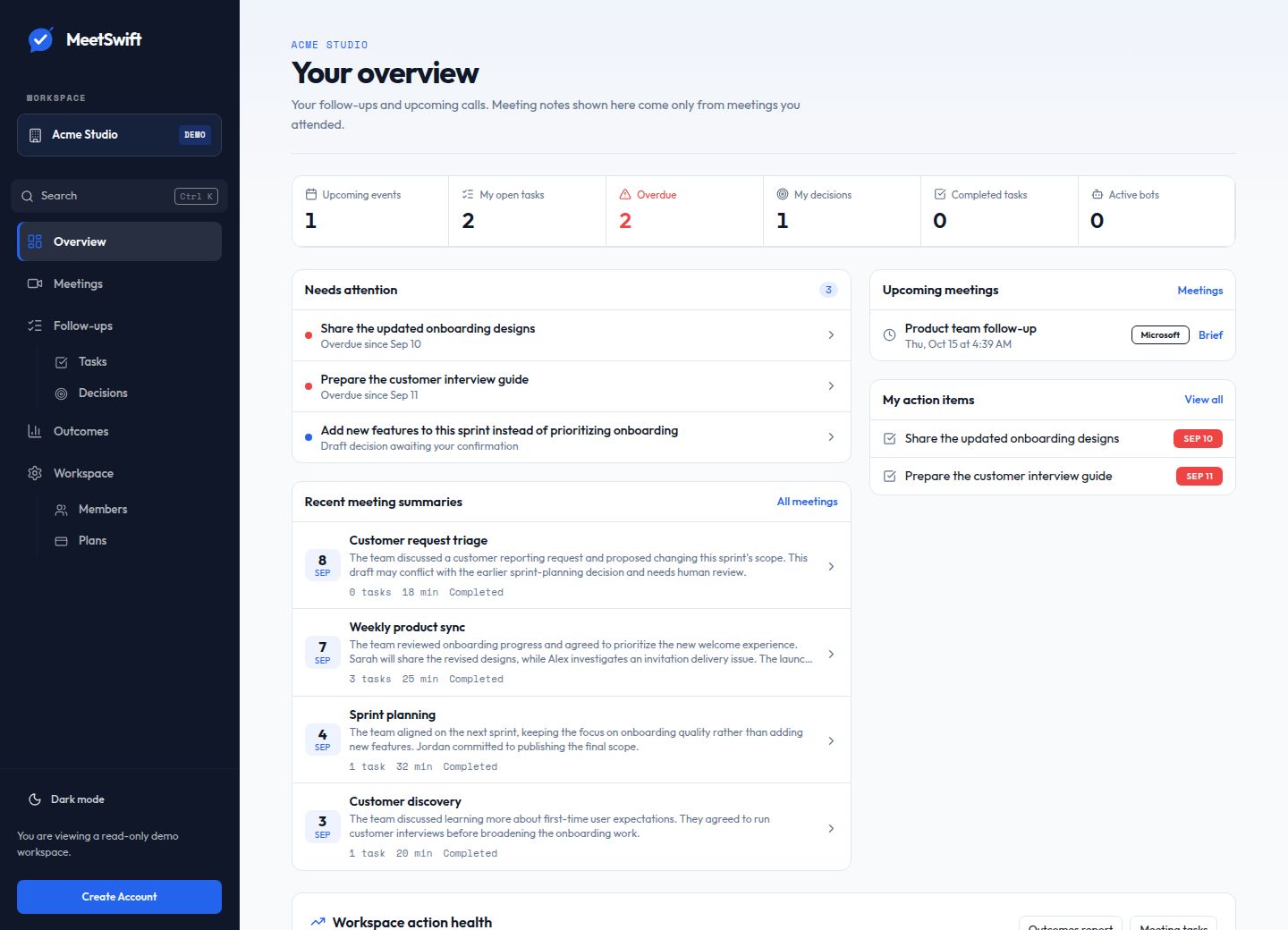
Needs attention
Overdue tasks, blocked work and decisions waiting for sign-off, in one list.
- 02
Decision register
Every decision on record, with the quote it came from. Owners confirm it before it's final.
- 03
Pre-meeting briefs
See what's still open from last time before you walk in.
- 04
Outcomes report
Completion rates and trends, so you can see which meetings lead to results.
- 05
Tasks where you already work
Send them to Microsoft To Do, email, or a private Slack or Teams channel.
- 06
Live transcript
Follow along during the call, with notes ready when it ends.
Notes don't move work forward. Owners do.
Most meeting tools stop at the transcript. You get a summary and a list of action items, and then nothing happens. MeetSwift is built for what comes after the call. Every task has an owner and a due date, every decision is on record, and your whole team can see what's done and what's slipping.
Other tools take notes. MeetSwift makes sure the work gets done.
Private by design
You only see what you were in.
Notes come only from meetings you attended.
Consent comes first.
The person scheduling a recording must acknowledge participant notice and consent. Your team is responsible for providing notice and obtaining legally required consent.
AI drafts, people decide.
Summaries and assignments are drafts your team reviews. AI output can be wrong or incomplete; check names, dates and decisions against the source.
You choose where tasks go.
Before sending tasks to a connected service, review the selected destination and who can access it there.